
Foundations
What Is an Agentic OS?
What an agentic operating system actually is, how it differs from just another AI tool, and how My Command Center runs your business that way.
“Agentic OS” is suddenly everywhere. You may have seen the term in AI headlines and product pages—and wondered if it’s just another buzzword.
This post is the plain‑English version: what an agentic operating system actually is, how it’s different from yet another AI tool, and how My Command Center (MCC) has been building this model long before the term took off.
1. What “agentic OS” really means
First, break the phrase in two:
- Operating system (OS): The thing that runs everything else and coordinates the parts. On a computer, your OS manages files, apps, memory, and background tasks.
- Agentic: Built around agents—AI teammates that can take action on your behalf, not just answer questions.
Put together, an agentic OS is:
A single system where your business knowledge lives, AI agents use that knowledge to actually do the work, and you manage it all from one place.
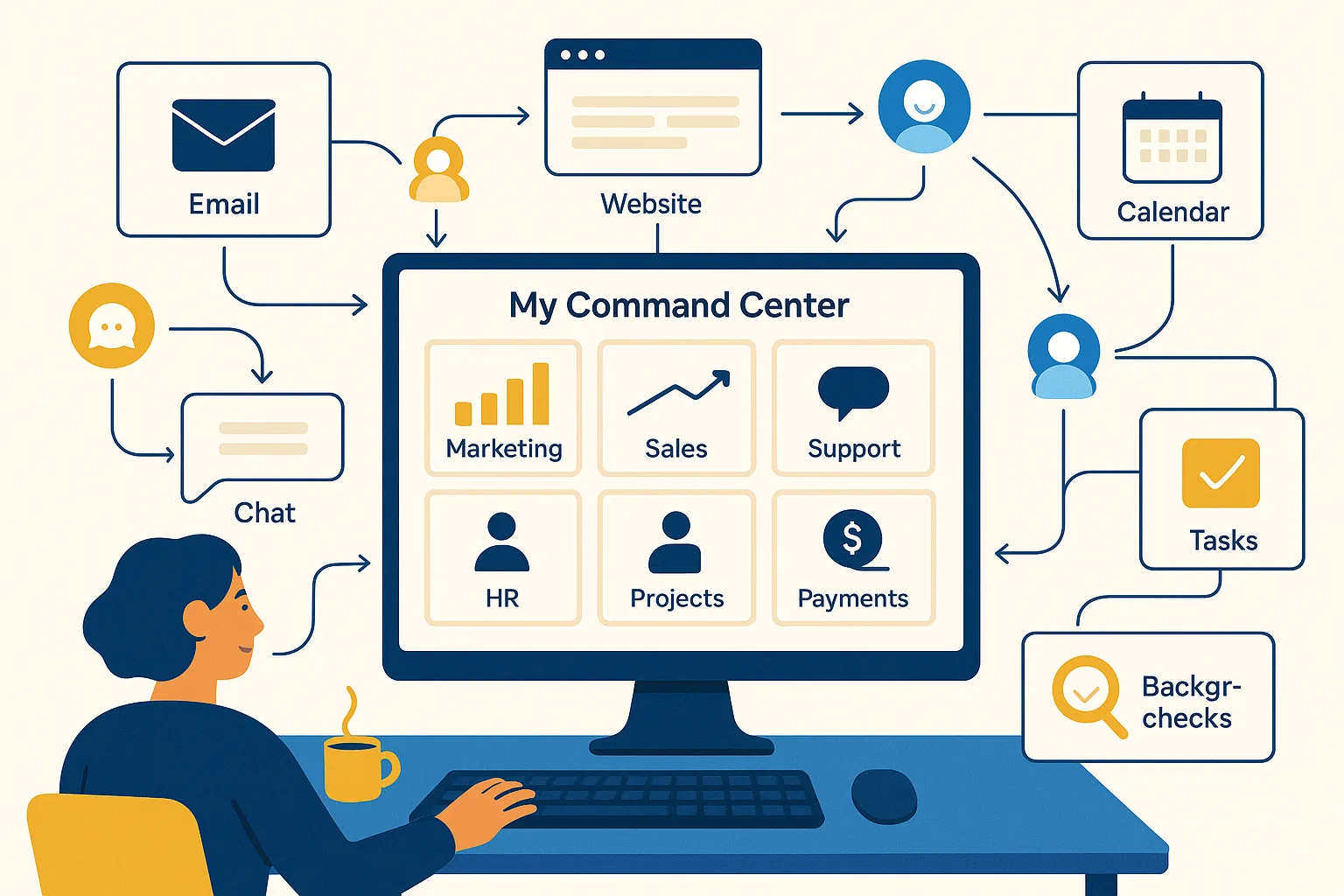
It’s not a chat window bolted onto your tools. It’s the layer that runs your operation—with agents doing real tasks across marketing, sales, support, HR, projects, and more.
At MCC, this is the core idea: you don’t need “one more tool.” You need a system that understands how your business works and helps you run it day to day.
2. OS vs. tool: why the distinction matters
A lot of products call themselves “agentic” because they have:
- A chatbot you can talk to
- A task list it can create or update
That can be useful—but it’s still a tool you operate, not a system that runs the operation.
A tool looks like this
- You open an app to write an email or a proposal.
- You paste context in so the AI “knows” what you’re talking about.
- You decide which tasks to give it.
- You bounce between tools when the work spans marketing, sales, support, and internal projects.
The burden is on you to remember the context, move data around, and glue everything together.
An operating system looks like this
- Your business knowledge is already in one place: playbooks, offers, policies, brand, customer history, docs, and more.
- Agents use that shared knowledge to execute work across channels and teams.
- You manage priorities, approvals, and performance from a single command center, not a dozen dashboards.
You’re no longer micromanaging the tools. You’re running the business, while the OS and its agents handle the repeatable work.
That’s the shift an agentic OS makes possible.
3. The three layers of MCC’s agentic OS
MCC is designed around three layers that work together: Knowledge → Agents → Command Center.
Layer 1: Knowledge — everything your business knows
This is the foundation. MCC pulls together what your business “knows,” including:
- Offers, pricing, and services
- Brand voice and messaging
- Sales and support playbooks
- HR policies and processes
- Project templates and checklists
- Documents and notes that actually matter day to day
Instead of trying to remember where that Google Doc or Notion page lives—or pasting snippets into a chat—you teach the system once. That shared knowledge powers every agent.
Layer 2: Agents — who does the work
On top of that shared knowledge, MCC gives you working teams of agents, not a single generic assistant. These are structured around real business functions, such as:
- Marketing – campaigns, emails, social, content support
- Sales – follow‑ups, summaries, prep, and coordination
- Support – responding based on your policies and past answers
- HR – recurring people ops tasks and workflows
- Website – updates, content, and coordination with your other channels
- Project Management – tracking tasks, owners, and progress across the work
Each team plugs into the same knowledge base, so you don’t have to re‑teach them from scratch.
At the center is Macey, your chief‑of‑staff agent. Macey’s job is to:
- Coordinate across teams
- Keep track of what’s in motion
- Surface what needs your review or decision
Instead of you manually juggling everything, Macey helps keep the operation moving.
Layer 3: Command Center — one place to run it all
All of this comes together in a single command center view:
- See what each agent and team is working on
- Approve, redirect, or pause work
- Set priorities and goals
- Track the health of your marketing, sales, support, and internal projects in one place
This is what makes MCC an operating system, not a point solution. You’re not logging into one “AI thing” for marketing, another for support, another for HR. You’re running the whole show from one OS.
4. Why we say “we were early” on the agentic OS
MCC didn’t start with the buzzword and work backward. The platform has been built from day one around:
- Grounding everything in your knowledge of the business
- Delivering full solutions, not isolated tools
- Partnering with you to stand the system up and keep it aligned with how you actually operate
That’s why you don’t just “sign up for software” and hope it fits. You work with MCC to:
- Capture and organize your knowledge
- Stand up the right teams of agents for your business
- Tune how they work with your human team
The point isn’t that AI is magic. It’s that, when it’s structured as an operating system instead of a feature, it can reliably carry real operational weight.
5. Why an OS beats a pile of disconnected AI tools
If you’re like most small businesses, you’ve already felt the tool sprawl problem:
- A writing assistant for emails
- A chatbot on your website
- A separate help desk AI
- A project management bot
- Plus a handful of “agentic” sidekicks in different apps
Each one might be good at a tiny slice. But:
- None of them share a full picture of your business.
- You end up re‑explaining context over and over.
- You still have to coordinate everything yourself.
- Data and decisions are spread across tools, making it hard to see what’s really happening.
An agentic OS solves this in three ways:
- One source of truth Your knowledge isn’t scattered across docs and apps; it’s organized in one place and used consistently.
- Agents that act, not just chat Because they’re grounded in your knowledge and connected to your systems, agents can draft, route, update, and follow through—not just suggest.
- A single place to lead from You’re not managing a dozen tools; you’re managing outcomes from your command center, with clear visibility into what’s going on.
For a small business, that means:
- Less time copying and pasting between apps
- Fewer dropped balls as work moves between marketing, sales, and operations
- More confidence that your team (human and AI) is working from the same playbook
Next steps
If you’re a small business owner feeling pulled between “try every AI tool” and “ignore the hype,” an agentic OS gives you a third path:
- Treat AI as part of your operating system, not a side project.
- Centralize what your business knows so agents can work reliably.
- Run everything from one command center instead of a tangle of dashboards.
From here, your best next steps are:
- Clarify your operating system vision. List the core functions of your business—marketing, sales, support, HR, website, projects—and how work moves between them today.
- Identify the knowledge that already exists. Where are your playbooks, offers, policies, and processes living? Which parts are out of date or scattered?
- Decide what you want agents to own first. Pick one or two areas where consistent execution matters (follow‑ups, support replies, recurring communication) and imagine an agent owning 80% of that work, with you in the loop.
- Reach out to our team. We help businesses wade through the complexities and help you solve real problems in your business. Get in touch with us today!
MCC’s agentic OS is built to help you make that shift—from a pile of tools to a system that actually runs your operation. As you move through the rest of the Foundations content, you’ll see how knowledge, agents, and your command center come together in practice.
Ready to put this to work?